

Widgets that check their own plumbing: probe_url, a verifier agent, and one free repair
The single biggest source of dead widgets was code written against an imagined API. Now the builder fetches the endpoint while it writes, a verifier re-probes what it skipped, and a crash in the first 45 seconds buys one automatic fix.
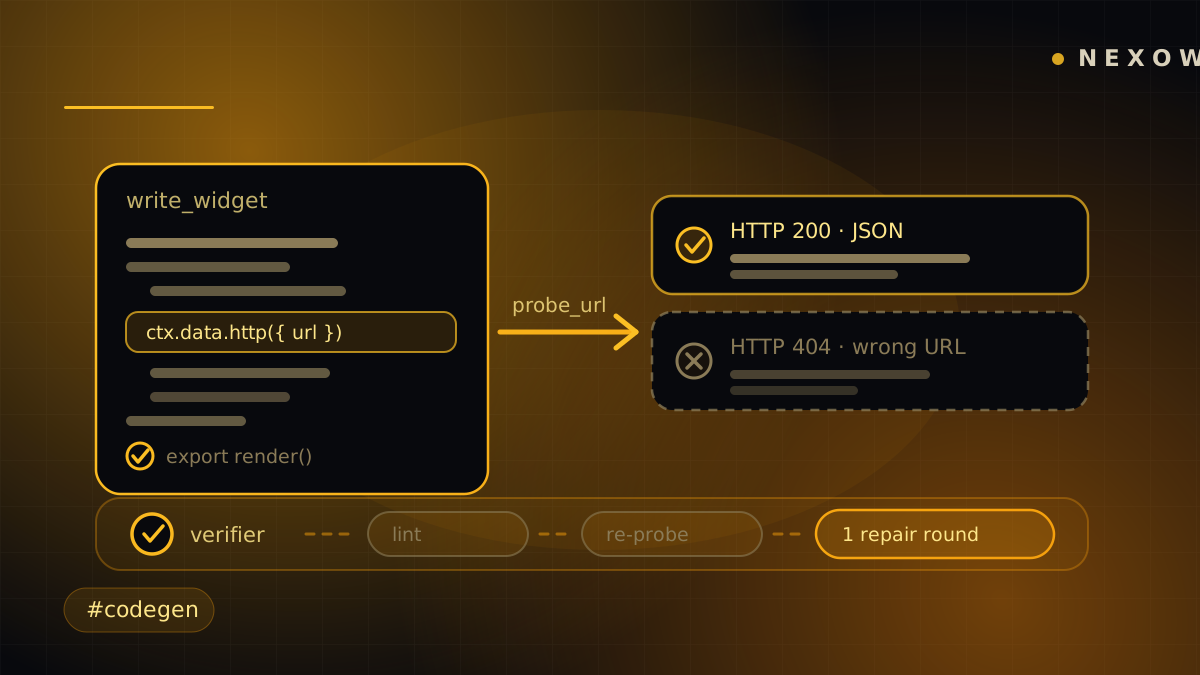
The most common way a generated widget failed was not a bug in the generated code. It was an endpoint that never existed.
The model reached for a URL from memory — or from a directory row whose link is a documentation page, not an endpoint — guessed the response shape, wrote careful parsing code against that guess, and shipped. What you got was an eternal spinner or an empty chart, with nothing on screen to say why.
This release closes that loop three times over: while the model writes, right after it writes, and once more if the thing still crashes in front of you.
While it writes: probe_url
The builder now has a tool that GETs a public keyless endpoint right now,
through the exact same server proxy ctx.data.http() uses at runtime, and hands
back the real HTTP status and the real response body.
That identity is the whole point. A probe that succeeds is a runtime call that succeeds. A probe that fails is a widget that would have shipped broken — and it fails now, while there is still a turn left to fix it, rather than in your canvas.
It sits at the bottom of a ladder the builder is told to work rather than reason from memory: venue reference docs first, then a directory of 691 keyless public APIs across 47 categories, searchable by topic across every entry’s name and description — because real requests (“tide times”, “air quality”) rarely map onto a category anyone would guess. That directory is always available to the builder now, whatever else is in scope, because it is the universal keyless fallback. Its links are documentation, so the last step is always the same: derive the endpoint, then probe it.
“Is there data for X?” is a question answered by looking, not by reasoning about which datasets probably exist. Reaching the end of the ladder and saying no after actually checking is a fine outcome. Asserting it from memory is not, and it was wrong far more often than it felt.
Right after it writes: the verifier
Asking the model to verify its own work is a request, not a guarantee. So the moment the widget code lands, two things happen that don’t depend on the model agreeing.
First, the tool result names the endpoints it never probed this turn and tells it to go check them while rounds remain.
Second — and this is the part that doesn’t rely on cooperation — a verifier runs concurrently with the model writing its summary, and does the work itself:
- Lint the module for the failure classes that are silent by construction.
A missing
renderexport. Code that doesn’t parse. A rawfetchorWebSocketto a third-party host, which the sandbox blocks — the single most damaging silent failure in generated widgets, because nothing appears in the console. An external image or video URL assigned straight to asrc. A hard-coded tile URL handed to a map library, which mounts and pans perfectly while every tile request is quietly refused. - Probe every endpoint the model skipped (up to five per module), and read the verdict the same way the model would: unreachable, or a 4xx that says the URL or its parameters are wrong.
Real problems buy one automatic in-turn repair round, with the probe output attached as evidence and an instruction to fix only what was named. That round happens while the build’s full context is still hot — far cheaper than shipping broken and spending a whole new turn on it later. If the model rewrites the module mid-flight, the verification already running is superseded and its verdict discarded. And a verifier that fails internally verifies clean: it can delay a build, never break one.
If it still crashes: one repair, hard-bounded
Self-repair context already fed runtime errors into the next chat turn — but only when you sent one. A widget that crashed seconds after its build stayed broken until you noticed, reopened the composer and typed “it’s broken”.
Now the runtime host spends one automatic fix turn when a fresh build crashes. An automatic turn is the app spending your credits or your key, so the bounds are deliberately tight:
- only the version an AI build just produced — a crash in an old version you restored, or in code you hand-edited, never qualifies;
- only within 45 seconds of that build, because a crash an hour later is new information for you, not an obvious build defect;
- once per version, and a version produced by an auto-repair turn is itself ineligible. One build can trigger at most one automatic follow-up — never a chain of the model paying itself to keep failing.
The repair turn is worded as the app reporting a defect, and it carries the same instruction as everything above: if the failure involves a data endpoint, probe it before rewriting. Fix it, keep what works, don’t grow the widget’s scope.
On the server side, a rescued background build now waits when another turn of the same widget is already live, instead of racing it into a duplicate version.
Same loop, every mode
All of this lives in one shared module, so platform builds, bring-your-own-key builds in the browser, and the server-side build sweep get identical behaviour — same tools, same probe formatting, same verifier, same repair budget. The modes cannot drift on which tools exist or how strictly a widget is checked, because there is only one implementation of the answer. It is also the loop that produced the ten example widgets shipping with the next release: they were built by exactly this, with exactly these checks.
None of it makes a model correct. It makes being wrong survivable, and usually invisible: the endpoint gets checked before the code depends on it, the check runs whether or not the model felt like running it, and the first crash gets one honest attempt at a fix before it reaches you.
Launch Nexow and ask for something obscure — tide times, air quality, public holidays. Watch the activity rail probe the endpoint before it writes a line of parsing code.
Build your first widget in the next minute
Open the preview, describe one useful thing, and place it on your canvas.